DevOps Guide
Ship every commit through one pipeline you trust
A pipeline earns its keep by answering two questions fast: is this change safe, and can I undo it? This guide builds that on GitHub Actions - lint, test, and build in one job, a preview URL on every pull request, a production release on merge, and a rollback that takes one click and no heroics.
About 7 min read. Action versions and pricing verified August 2026.
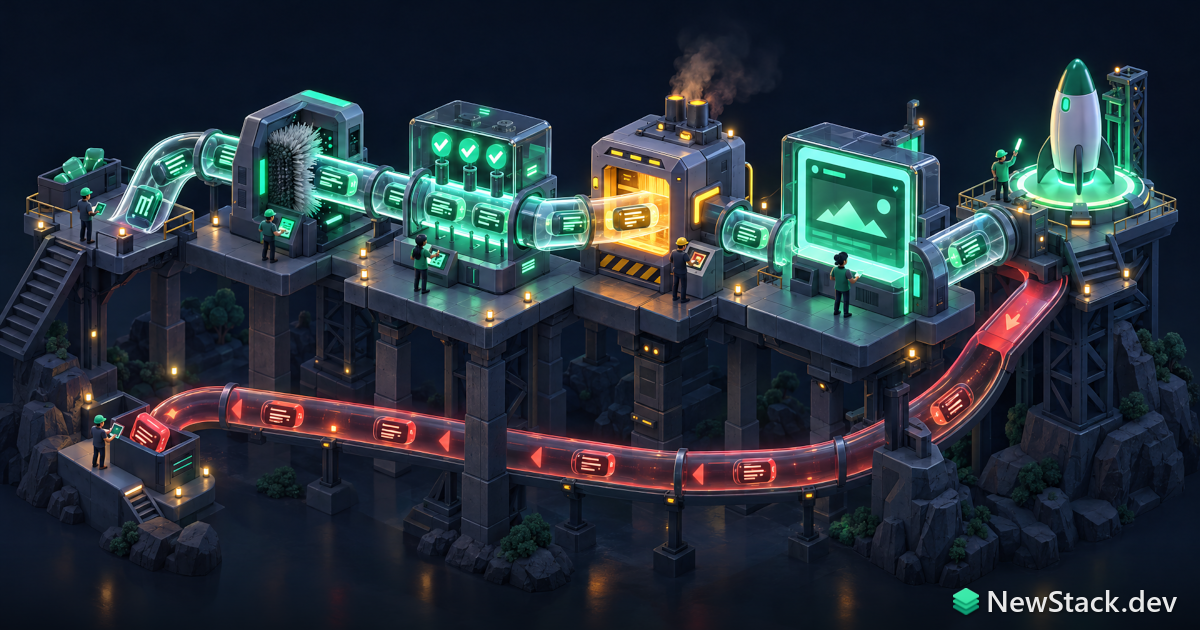
What a pipeline is actually for
Continuous integration is not a badge in a README. It is a contract: nothing reaches the default branch that has not been linted, type checked, tested, and built from a clean checkout. Continuous delivery adds the second half - the artifact that passed those checks is the exact artifact that gets deployed, and a previous artifact is always one command away.
Everything below runs on GitHub Actions, which reached roughly 33 percent organizational adoption in 2026 and is the default for anything already hosted on GitHub. The shapes translate directly to GitLab CI or CircleCI; only the YAML keys change. Private repositories get 2,000 free Linux minutes a month on the Free plan, and GitHub cut hosted-runner rates by up to 39 percent on 01-01-2026, so Linux 2-core now bills at $0.006 per minute.
Four stages, in order, each one gating the next.
- Verify. Lint, types, unit tests, and a real production build. Runs on every pull request and every push to main.
- Preview. Deploy the built artifact to a throwaway URL and comment it on the pull request.
- Release. On merge, promote that same artifact to production behind a protected environment.
- Recover. A manual workflow that redeploys any previous commit by SHA, with no rebuild required.
Step 1: the verify job
Start with one job, not five. Splitting lint, test, and build across parallel jobs sounds faster and usually is not: each job pays its own checkout, runtime setup, and dependency install, which is 30 to 60 seconds of pure overhead per job. Split only once a single job passes about four minutes.
# .github/workflows/ci.yml
name: CI

on:
  pull_request:
  push:
    branches: [main]

permissions:
  contents: read

concurrency:
  group: ci-${{ github.workflow }}-${{ github.ref }}
  cancel-in-progress: true

jobs:
  verify:
    runs-on: ubuntu-latest
    timeout-minutes: 10
    steps:
      - uses: actions/checkout@v7
      - uses: actions/setup-node@v7
        with:
          node-version: 22
          cache: npm
      - run: npm ci
      - run: npm run lint
      - run: npm run typecheck
      - run: npm test
      - run: npm run build
      - uses: actions/upload-artifact@v7
        with:
          name: dist-${{ github.sha }}
          path: dist/
          retention-days: 14
Four details in there matter more than the rest. concurrency with cancel-in-progress kills the previous run when someone pushes again, which is the single cheapest way to cut your bill. timeout-minutes stops a hung test suite from burning six hours. permissions: contents: read makes the default token read-only, so a compromised dependency in a build script cannot push. And uploading dist/ means the deploy stage never rebuilds - it ships the bytes that passed.
Step 2: keep the run under five minutes
Past five minutes people stop waiting for the check and start merging on faith. These are the levers, in the order they pay off.
| Lever | What it saves |
|---|---|
| cache: npm on setup-node | One line, keys itself off the lockfile, and typically turns a 60 second install into 10. Works for npm, pnpm, and yarn. |
| actions/cache@v6 | For everything setup-node does not know about: Playwright browsers, Next.js build cache, Turborepo and Nx local caches, Rust or Go module dirs. |
| concurrency + cancel-in-progress | Stops paying for runs nobody will read. On an active repo this alone can halve minutes consumed. |
| paths-ignore on push triggers | Skip the whole pipeline for docs-only commits. Use with care: a required check that never runs blocks the merge queue. |
| matrix with fail-fast: false | Runs versions or shards in parallel. Keep it to the versions you actually support, since every cell is billed separately. |
| npm ci, never npm install | Installs exactly the lockfile, skips resolution, and fails loudly when the lockfile is stale instead of silently drifting. |
A matrix is the right tool when you genuinely support several runtimes, or when a test suite is long enough to shard. Both look the same in YAML:
  test:
    runs-on: ${{ matrix.os }}
    strategy:
      fail-fast: false
      matrix:
        os: [ubuntu-latest, windows-latest]
        node: [22, 24]
        exclude:
          - os: windows-latest
            node: 22
    steps:
      - uses: actions/checkout@v7
      - uses: actions/setup-node@v7
        with:
          node-version: ${{ matrix.node }}
          cache: npm
      - run: npm ci
      - run: npm test
Gotcha: fail-fast defaults to true, so the first red cell cancels the rest and you learn about one failure instead of four. Turn it off on any matrix you use for diagnosis.
Step 3: preview deploys on every pull request
A preview URL converts code review from reading a diff into using the feature. Cloudflare Pages, Vercel, Netlify, and Render all create one automatically from a branch; if you are deploying to your own infrastructure, a per-PR subdomain and a container is the equivalent. Read the hosting layer directory for who does this well.
The important part is what the preview job is allowed to do. Pull requests from forks run with a read-only token and no access to repository secrets, which is a feature, not a bug. Never reach for pull_request_target to work around it while also checking out the pull request head - that combination hands an attacker your secrets and is the most common way public repos get compromised.
  preview:
    needs: verify
    if: github.event_name == 'pull_request'
    runs-on: ubuntu-latest
    permissions:
      contents: read
      pull-requests: write
    environment:
      name: preview
      url: ${{ steps.deploy.outputs.url }}
    steps:
      - uses: actions/download-artifact@v8
        with:
          name: dist-${{ github.sha }}
          path: dist
      - id: deploy
        run: ./scripts/deploy-preview.sh dist
        env:
          DEPLOY_TOKEN: ${{ secrets.DEPLOY_TOKEN }}
needs: verify is what makes this a pipeline rather than a pile of workflows. The preview never runs unless the checks passed, and it consumes the artifact the checks produced.
Step 4: release, and the rollback you will need
Production gets its own workflow, triggered by a push to main, wrapped in a GitHub Environment with required reviewers if your team wants a human gate. The environment is also where production secrets live, so a pull request workflow physically cannot read them.
Rollback is the step everyone skips and everyone eventually needs at an inconvenient hour. The cheapest version that actually works: tag every deployable artifact or container image with the commit SHA, keep the last twenty, and expose a manual workflow that redeploys one by name. No rebuild, no cherry-pick, no praying that main still compiles.
# .github/workflows/rollback.yml
name: Rollback

on:
  workflow_dispatch:
    inputs:
      sha:
        description: Commit SHA to redeploy
        required: true
        type: string

permissions:
  contents: read

jobs:
  rollback:
    runs-on: ubuntu-latest
    environment: production
    steps:
      - run: ./scripts/promote.sh "ghcr.io/acme/app:${{ inputs.sha }}"
        env:
          DEPLOY_TOKEN: ${{ secrets.DEPLOY_TOKEN }}
Practice it once on a Tuesday afternoon. A rollback path nobody has ever exercised is a rollback path that does not exist. If your deploy target is a container registry, the Docker cheatsheet covers tagging and pushing images by SHA, and container tools covers where those images should run.
Handling secrets without leaking them
Masking is not security. GitHub redacts secret values from logs, but any step that can read a secret can also base64 it into an HTTP request. The controls that matter are about who can read what, not about hiding strings.
- Scope secrets to environments. Production credentials belong on the production environment, not the repository, so only jobs declaring environment: production can see them.
- Use OIDC instead of long-lived cloud keys. Set permissions: id-token: write and let AWS, GCP, or Azure trade a short-lived token for the workflow identity. There is then no static key to steal or rotate.
- Set permissions explicitly at the top of every workflow. The default token is far more powerful than most jobs need. Start at contents: read and add scopes per job.
- Pin third-party actions. First-party actions/* by major tag is fine; anything else should be pinned to a full commit SHA, because a mutable tag is a supply-chain hole.
- Never pass a secret as a command-line argument. Process listings and error traces are not redacted. Use env: on the step instead.
CI/CD pipeline questions, answered
How long should a CI pipeline take?
Under five minutes for the checks that gate a merge. Past that, developers stop watching the run and start merging on faith, which defeats the point. Get there with lockfile-keyed dependency caching, a single verify job instead of several, concurrency cancellation on superseded runs, and sharding only the test suite that genuinely needs it.
Should CI run on every push or only on pull requests?
Both, with different triggers. Run the full verify job on pull requests because that is what protects the branch, and run it again on pushes to main because merge queues, squash merges, and direct commits can produce a state no pull request ever tested. Add concurrency cancellation so rapid pushes to the same branch do not stack up billable runs.
Do I need self-hosted runners?
Almost certainly not at first. Hosted Linux runners bill at $0.006 per minute after the free allowance, so a team burning 10,000 minutes a month pays about $48. Self-hosted runners make sense when you need specific hardware, large persistent caches, access to a private network, or macOS at volume, and they cost you the maintenance and isolation work GitHub was doing for you.
What is the simplest rollback that actually works?
Tag every build artifact or container image with its commit SHA, retain the last twenty, and add a manual workflow_dispatch workflow that redeploys one by SHA without rebuilding. Reverting the commit and waiting for a fresh pipeline is slower and can fail for unrelated reasons. Exercise the rollback path on a calm afternoon, because an untested one does not count.
Where to go next
Every key used above is documented in the GitHub Actions cheatsheet, grouped by task. If GitHub Actions is not a given for your team, CI/CD tools compared sizes up GitLab CI, CircleCI, Buildkite, and Jenkins on price and lock-in.
The pipeline is only as good as the suite it runs, so pick a runner deliberately in the testing tools directory. And if the deploy target is a server you own rather than a platform, the self-hosting guide covers what to point these workflows at.